
Pricing
A suite that matches the big players with a price that leaves them behind.
Construction Management Software Tailored To You.
We believe you should only pay for what you use. SmartStruct is a full suite. No hidden fees.
All In One, From The Start
STARTER
ยฃ28
per user, per month
- Unlimited Site Users
- 1 Super User
- 2h Onboarding
- 1h Training
- .
- .
PRO
ยฃ49
per user, per month
- Unlimited Site Users
- 2-50 Super Users
- Onboarding Available
- 4h Training
- Learning Portal Access
- Dedicated Account Manager
BUSINESS
ยฃ45
per user, per month
- Unlimited Site Users
- 51-250 Super Users
- Onboarding Available
- 6h Training
- Learning Portal Access
- Dedicated Account Manager
BUSINESS+
ยฃ39
per user, per month
- Unlimited Site Users
- 250+ Super Users
- FREE Onboarding
- 10h Training
- Learning Portal Access
- Dedicated Account Manager
Let’s Break It Down
Below youโll find a clear breakdown of whatโs included in each SmartStruct plan, so you can easily compare what you get at every level. Weโve organised features alongside our pricing tiers to help you see at a glance which option matches your team size and needs โ from essential capabilities to full platform access. Pick the plan that fits your workflow now and scales as you grow.
- Site Management
- Tasks
- Doc Structure
- Photos
- TimeStamp & Geo Location
- Reporting
- Exports
- Drawings
- Revision Overlays
- BIM Viewer
- 0
- Estimation
- Custom Proposals
- Bill of Quantities
- Unlimited Templates
- Cost Codes
- Cost Catalogues
- Waste Calculator
- Material Imports
- BIM Viewer
- .0
- Takeoff
- Assemblies
- Multiple Units of Measure
- Drawing Revision Overlay
- Takeoff Views
- BOQ Prompts
- Drawing Editor
- Financial
- Budgeting
- Cashflow
- Variations
- Purchase Orders
- Payment Application
- Invoicing
- Budget Changes
- Custom Dashboard
- .0
- Project Management
- Projects
- Scheduling
- Delays & Conflicts
- RFIs
- Snagging
- Tasks
- Site Diary
- Inspections
- Deliveries
- Visitors
- Accidents
- Violations
- Skips & Waste
- Photos
- Drawings
- Revisions
- Document Structures
- Specifications
- Sub-contractor & Consultant Access
- Client Access
- O&M Manuals
- BIM Viewer
- Custom Dashboard
- .0
- Admin & Support
- Onboarding
- Training
- Learning Portal
- Locations
- Permissions
- Directory
POPULAR
.
Starter
Site Management:Site Management:Comparison 1:
.Comparison 2:
๏Doc Structure:Comparison 3:
๏Photos:Comparison 4:
๏TimeStamp & Geo Location:
๏Reporting:
๏Exports:Exports:
๏Drawings:Drawings:
๏Revision Overlays:Revision Overlays:
๏BIM Viewer:BIM Viewer:
๏:
.Estimation:
.- ๏
Bill of Quantities:
๏Unlimited Templates::
๏Cost Codes:
๏Cost Catalogues:
๏Waste Calculator:
๏Material Imports:
๏BIM Viewer:
๏:
.Takeoff:
.Assemblies:
๏Multiple Units of Measure:
๏Drawing Revision Overlay:
๏Takeoff Views:
๏BOQ Prompts:
๏Drawing Editor:
๏:
.Financial:
.Budgeting:
๏Cashflow:
๏Variations:
๏Purchase Orders:
๏Payment Application:
๏Invoicing:
๏Budget Changes:
๏Custom Dashboard:
๏::
Project Management:Project Management:
Projects:Projects:
Unlimited- ๏
Delays & Conflics:Delays & Conflics:
๏- ๏
Snagging:
๏- ๏
- ๏
- ๏
- ๏
- ๏
- ๏
- ๏
- ๏
- ๏
- ๏
- ๏
- Unlimited
Specifications:
๏Sub-contractor & Consultant Access:
UnlimitedClient Access:
๏O&M Manuals:
๏BIM Viewer:
๏Custom Dashboard:
๏.:
Oboarding:
4Training:
๏Learning Portal:
๏Locations:
๏Permissions:
๏Directory:
๏
POPULAR
.
Pro
Site Management:Comparison 1:
.Comparison 2:
๏Comparison 3:
๏Comparison 4:
๏TimeStamp & Geo Location:
๏- ๏
Exports:
๏Drawings:
๏Revision Overlays:
๏BIM Viewer:
๏:
.Estimation:
.Custom Proposals:
๏- ๏
:
๏- ๏
- ๏
- ๏
- ๏
- ๏
:
.Takeoff:
.- ๏
- ๏
- ๏
- ๏
- ๏
- ๏
:
.Financial:
.- ๏
- ๏
- ๏
- ๏
- ๏
- ๏
- ๏
- ๏
::
Project Management:
Projects:Projects:
Unlimited- ๏
Delays & Conflics:
๏- ๏
- ๏
- ๏
- ๏
- ๏
- ๏
- ๏
- ๏
- ๏
- ๏
- ๏
- ๏
- ๏
- Unlimited
- ๏
- Unlimited
- ๏
- ๏
- ๏
- ๏
- 4
- ๏
- ๏
Locations:
๏- ๏
Directory:
๏
POPULAR
.
Business
Site Management:Comparison 1:
.Tasks:Comparison 2:
๏Doc Structure:Comparison 3:
๏Comparison 4:
๏- ๏
- ๏
Exports:
๏Drawings:
๏- ๏
BIM Viewer:
๏:
.Estimation:
.- ๏
- ๏
:
๏- ๏
- ๏
- ๏
- ๏
- ๏
:
.Takeoff:
.- ๏
- ๏
- ๏
- ๏
- ๏
- ๏
:
.Financial:
.- ๏
- ๏
- ๏
- ๏
- ๏
- ๏
- ๏
- ๏
Projects:
Unlimited- ๏
- ๏
- ๏
- ๏
- ๏
- ๏
- ๏
- ๏
- ๏
- ๏
- ๏
- ๏
- ๏
- ๏
- ๏
- Unlimited
- ๏
- Unlimited
- ๏
- ๏
- ๏
- ๏
- 6
- ๏
- ๏
- ๏
- ๏
- ๏
POPULAR
.
Business+
Site Management:Comparison 1:
Comparison 2:
๏Comparison 3:
๏Comparison 4:
๏- ๏
- ๏
Exports:
๏Drawings:
๏- ๏
- ๏
:
.Estimation:
.- ๏
- ๏
:
๏- ๏
- ๏
- ๏
- ๏
- ๏
:
.Takeoff:
.- ๏
- ๏
- ๏
- ๏
- ๏
- ๏
:
.Financial:
.- ๏
- ๏
- ๏
- ๏
- ๏
- ๏
- ๏
- ๏
Projects:
Unlimited- ๏
- ๏
- ๏
- ๏
- ๏
- ๏
- ๏
- ๏
- ๏
- ๏
- ๏
- ๏
- ๏
- ๏
- ๏
- Unlimited
- ๏
- Unlimited
- ๏
- ๏
- ๏
- ๏
- 10
- ๏
- ๏
- ๏
- ๏
- ๏

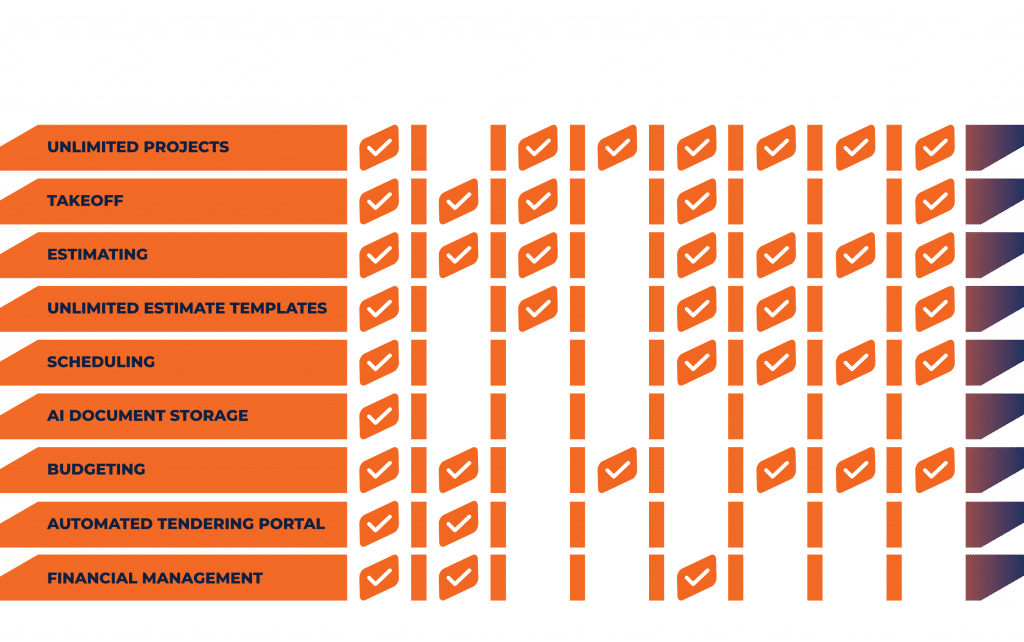
HOW WE COMPARE.
We designed SmartStruct to cover everything you need from day one. No extra apps, no extra fees. One price fixed for your term.
See how it compares to other leading platforms’ core tools.
Looking to move from your current provider? We also help you transfer all your data, securely and quickly, so there’s no tiresome manual inputting. We also provide training and ongoing support.
What Our Users Have To Say
Check out our Trustpilot to see what our users and their staff have to say about SmartStruct.
What Is Construction Management Software?
Itโs a digital tool designed to help construction companies plan, coordinate, and manage projects more efficiently. It brings together tasks like scheduling, budgeting, document management, and team communication into one platform.
Who Uses Construction Management Software?
- Main Contractors
- Sub Contractors
- Project Managers
- Site Supervisors
- Consultants
- Engineers
- Trades
- Clients
How Do I Transfer From My Current Construction Software?
Easy! Just import your data to Smartstruct using CSV templates. This can be done by yourself in a few clicks, or we can provide this service for you via our quick personal onboarding, from your existing provider or current files. We get you all set up in no time.
How Easy Is It To Get Started?
Donโt worry, after helping you with onboarding, we have a full training platform filled with videos and resources to help you get started.
What Does SmartStruct Cover?
- Project scheduling and task tracking.
- Budgeting and cost control.
- Estimating and takeoff.
- Document and drawing management.
- Real-time reporting and analytics.
- Communication and collaboration tools.
- Health & safety compliance tracking.
How Does Construction Software Help My Project?
By reducing paperwork, ensuring everyone has access to up-to-date information, and providing real-time insights, it helps projects stay on time and on budget.
Is SmartStuct Suitable For Small And Large Construction Projects?
Absolutely. Whether itโs a single-site build or a large multi-site development, construction management software can scale to fit the project size. Small and large businesses are welcome on the platform and can benefit from the tools they need.
Does SmartStruct Work On-Site As Well As In The Office?
Yes. We have the SmartStruct mobile app, available on Apple, Android and Google devices. So site teams can upload photos, update progress, or access documents directly from the field
How Much Does SmartStruct Cost?
Full access from ยฃ49 per user per month. Take a look at our price page for more details.
Contact Smartstruct for Expert Construction Management Services
Unit 1, Albion Close
Worksop
S80 1RA
Call: 0333 038 4104
Email: demo@smartstruct.com
